Getting Started with cURL
What is cURL ?
cURL is a command-line tool used to transfer data between a server and a system using different network protocols. It is generally used to fetch web content, test APIs and sending or receiving data over a network. It supports multiple protocols like HTTP, HTTPS, FTP, and SCP.
It is used to download and upload data from the terminal. It is helpful for testing REST APIs and web services.
When we run the cURL command with a website URL, it sends an HTTP GET request to the server asking for the webpage. The server responds with HTML because websites are meant to be displayed in browsers, and HTML is the format browsers understand. cURL does not try to render or interpret this HTML. It simply prints the server’s response exactly as it receives it, which is why the terminal shows raw HTML code.
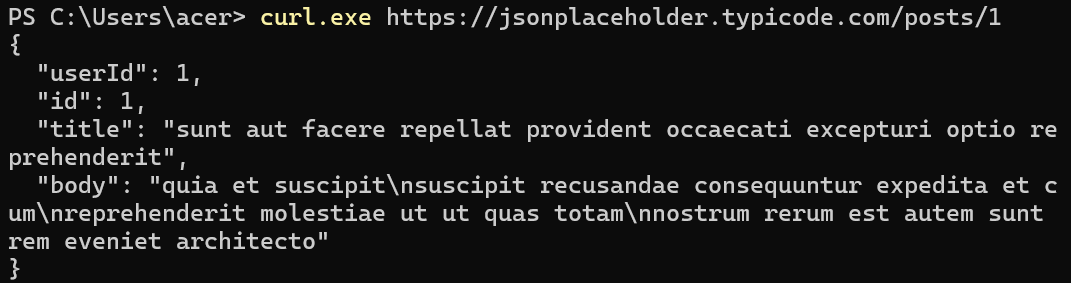
When cURL is used with an API instead of a website, the behavior is the same but the response format is different. APIs are designed to return data, not web pages, so the server usually responds with JSON. cURL prints this JSON directly in the terminal. The difference in output is not because cURL changes its behavior, but because the server sends different types of responses depending on whether the request is made to a website or an API.
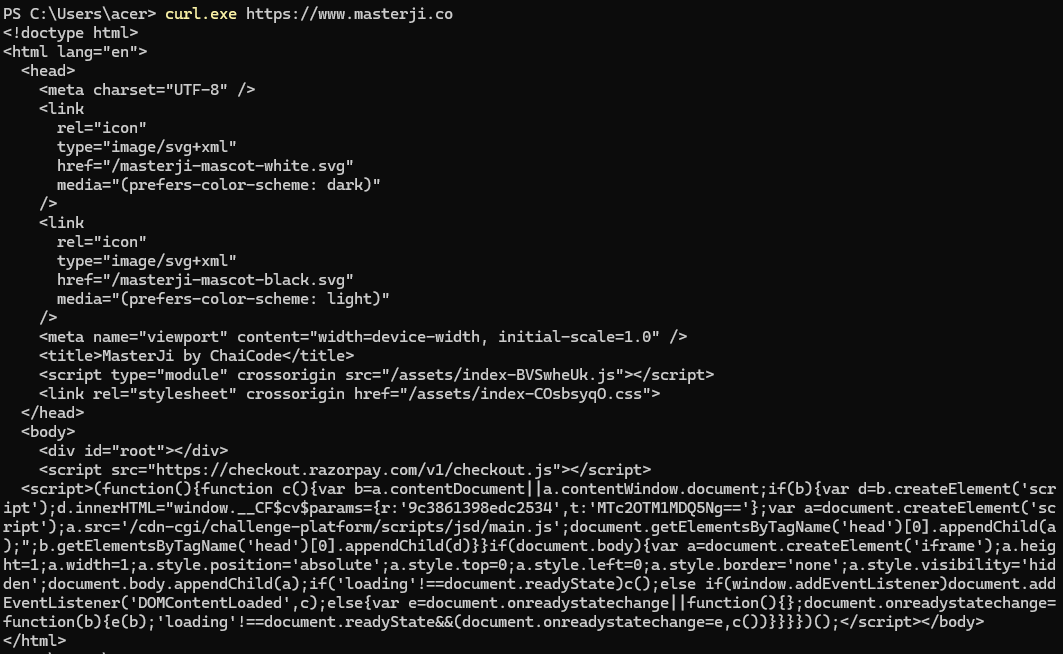
When cURL is used with an API, it sends an HTTP GET request to the server. A GET request simply means that you are asking the server to give you some data. In this case, the URL ends with /posts/1, which clearly tells the server what data is being requested.
The part posts refers to a collection of posts stored on the server, and the number 1 is the unique identifier of a single post inside that collection. Every post in the database has its own ID so the server can quickly find and return the exact record requested. When the server receives this request, it looks for the post whose ID is 1 and fetches its data.
After finding the correct post, the server sends back the details of that post in JSON format. cURL then prints this response body exactly as it is received, without modifying or interpreting it. That is why you see the data for post with ID 1 and not any other post. The response directly matches what was asked for in the URL.
Why Programmers Need cURL
Programmers need cURL because it allows them to talk directly to servers without using a browser or a user interface. Browsers hide many technical details such as headers, status codes, and request methods. cURL exposes these details clearly, which makes it easier to understand what is actually happening during a web request. It is commonly used to check whether a server is working, test APIs, debug backend issues, and verify responses before connecting them to frontend applications.
Another important reason programmers use cURL is consistency. The same cURL command works across different operating systems, which makes it a reliable tool for testing and learning. Whether someone is working on backend development, DevOps, or security, cURL provides a simple and direct way to communicate with web servers.
Making Your First Request Using cURL
The simplest way to use cURL is by making a GET request to a URL. When you run a basic cURL command, it automatically sends a GET request and prints whatever the server returns.
For example, running a command with a website URL returns HTML, while running it with an API endpoint returns JSON. This first request helps beginners understand that cURL is not about visuals but about data exchange. The output you see is exactly what the server sends back, without any processing or rendering.
This basic request is the foundation for learning more advanced usage of cURL.
Understanding Request and Response
Every interaction using cURL follows a simple pattern: a request is sent, and a response is received. The request includes information such as the URL, the HTTP method, headers, and sometimes data. The response includes a status code, headers, and a response body.
The status code tells you whether the request was successful or not. The response body contains the actual data or content returned by the server. Understanding this request–response cycle is essential because it is the core of how the web works. cURL helps make this process visible and easy to inspect.
Using cURL to Talk to APIs
APIs are designed to exchange data, not web pages. When cURL is used with an API, it sends requests and receives structured data, usually in JSON format. This makes cURL a powerful tool for testing APIs without building a frontend.
Programmers can use cURL to send different types of requests, such as GET for fetching data or POST for sending data. By using cURL, developers can confirm that an API endpoint works correctly, returns the expected data, and handles inputs properly. This is often the first step before integrating an API into an application.
Common Mistakes Beginners Make with cURL
One common mistake beginners make is confusing website URLs with API endpoints and expecting the same type of output. Websites return HTML, while APIs return data like JSON. Another frequent mistake is using PowerShell’s curl alias instead of the actual cURL tool, which leads to unexpected output.
Beginners also often forget that cURL does not execute JavaScript or render pages. If a website appears empty or incomplete, it is usually because the content is loaded dynamically by JavaScript. Understanding these limitations helps avoid confusion and frustration when using cURL.8